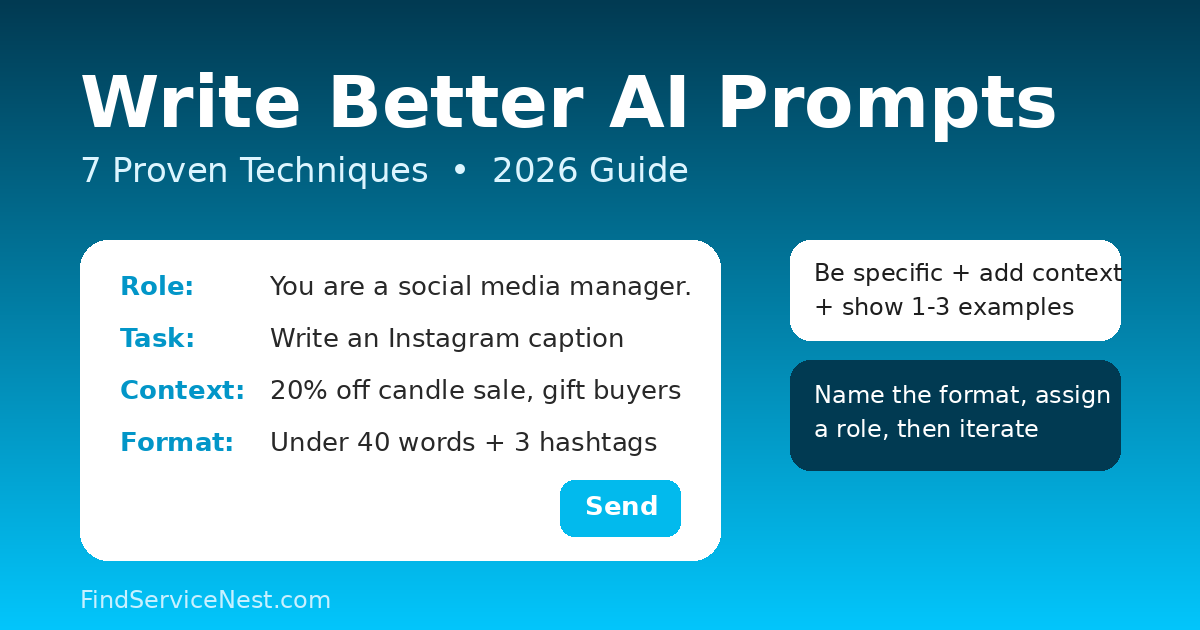
To write better AI prompts in 2026, be specific about what you want, add background context, show 1–3 examples of the answer you expect, name the format and length, assign the AI a role or tone, break big jobs into steps, and refine the prompt when the first answer misses the mark. These seven techniques come from the official prompting guides published by OpenAI and Google.
Why do most AI prompts get disappointing results?
Most bad AI answers are caused by vague prompts, not by a weak model. A prompt like “write something about marketing” leaves the AI guessing about the audience, the length, the tone, and the goal — so it fills in the blanks itself.
OpenAI’s own prompt engineering guidance puts it plainly: prompts should be clear, specific, and provide enough context for the model to understand what you are asking, because ambiguity leads to inaccurate or irrelevant responses.
The good news: prompting is a learnable skill, and small phrasing changes can turn a generic answer into exactly what you need.
What are the 7 techniques for better AI prompts?
1. Say exactly what you want — with numbers
Replace vague words with concrete details. Instead of “write a short email,” try “write a 3-sentence follow-up email to a job recruiter in a friendly tone.” Instead of “summarize this,” try “summarize this article in 5 bullet points, each under 15 words.”
Numbers remove guesswork. Length, count, and structure are the easiest details to add, and they make the biggest difference.
2. Give the AI background context
An AI model can only work with what you put in the prompt. Google’s prompting documentation stresses that the model relies on the context you provide — without it, answers default to generic.
Paste the facts the AI needs: who the audience is, what product you’re describing, any constraints or deadlines. Two or three sentences of context can rescue an otherwise doomed prompt.
3. Show an example (few-shot prompting)
One of the most reliable techniques is to include examples of the output you want. Google Cloud’s documentation calls these few-shot prompts: you show the model 1–3 input/output examples, and it learns the pattern, format, and phrasing from them.
Two rules make this work:
- Keep examples consistent. Use the same formatting across all examples — the model copies whatever pattern it sees.
- Pair examples with clear instructions. Google warns that without instructions, a model can pick up on unintended patterns from your examples and produce poor results.
But don’t overdo it: Google’s docs warn that too many examples can cause the model to overfit, copying the examples instead of answering your actual question. One to three good examples is usually enough.
4. Name the output format
Tell the AI exactly how to structure its answer: “return a table with 3 columns,” “reply in JSON,” “use a numbered list of 5 items,” “write it as a script with speaker labels.”
Format instructions are especially powerful combined with an example (technique 3). If you need structured output for a tool or spreadsheet, naming the format up front saves you from reformatting the answer yourself.
5. Break big tasks into smaller steps
Complex requests fail when everything is crammed into one prompt. Split the work: first ask for an outline, approve it, then ask the AI to expand one section at a time.
This step-by-step approach gives you control at each stage, keeps long answers on track, and makes it easy to fix one section without regenerating everything.
6. Assign a role and a tone
Giving the AI a persona shapes the entire response. “You are an experienced career coach” produces very different advice than “you are a stand-up comedian.”
OpenAI specifically recommends using descriptive adjectives for tone — words like formal, informal, friendly, professional, humorous, or serious. For example: “Explain this in a friendly and engaging tone.” A one-line role plus a tone word is often all it takes.
7. Iterate instead of starting over
Prompting is an iterative process, according to OpenAI: start with an initial prompt, review the response, then refine. Adjust the wording, add more context, or simplify the request based on what came back.
When an answer misses, diagnose it: too vague? Missing context? Wrong format? Fix that one thing and resend. Over time you’ll build a personal library of prompts that reliably work for recurring tasks.
How can you write a strong prompt in 30 seconds?
Use this formula: Role + Task + Context + Format + Constraints.
Weak: “Write a social media post about our sale.”
Strong: “You are a social media manager (role). Write an Instagram caption (task) for a 20% off weekend sale at our handmade candle shop, aimed at gift buyers (context). Keep it under 40 words with 3 hashtags (format). Friendly tone, no emojis in the first line (constraints).”
The strong version takes seconds longer to write and saves minutes of back-and-forth.
What prompting mistakes should you avoid?
- Contradictory instructions — “be brief but cover everything in detail” forces the model to guess which rule wins.
- Dumping in ten examples — as Google notes, this can cause overfitting to the examples.
- One giant prompt for five jobs — split it up (technique 5).
- Assuming the AI knows your files, dates, or company details — it only knows what you include in the prompt.
Frequently asked questions
Do longer prompts always get better answers?
No. Clear and complete beats long. A 30-word prompt with a role, task, context, and format outperforms a 300-word ramble. Add details that matter — audience, length, tone, examples — and cut filler.
What is few-shot prompting?
Few-shot prompting means including examples in your prompt so the model can copy the pattern. A prompt with no examples is called zero-shot. Per Google Cloud’s documentation, few-shot prompts are more reliable for controlling formatting, phrasing, and scoping.
Do these techniques work on ChatGPT, Gemini, Claude, and other AI tools?
Yes. These are general principles of how large language models respond to instructions, drawn from the official guides of OpenAI and Google. The exact wording that works best can vary slightly between models, so re-test your most important prompts when you switch tools.
How many examples should I include in a prompt?
Usually 1 to 3. That’s enough for the model to learn the pattern. Keep the formatting identical across examples, and always add a clear instruction alongside them so the model doesn’t learn the wrong lesson from your examples.
If you want to understand what AI systems can do beyond chat, read our guide on what an AI agent is and how it works — and if you ever need to check whether a picture was machine-made, see how to tell if an image is AI-generated.
Sources
- OpenAI Help Center — “Prompt engineering best practices for ChatGPT”: https://help.openai.com/en/articles/10032626-prompt-engineering-best-practices-for-chatgpt
- Google Cloud Documentation — “Include few-shot examples”: https://docs.cloud.google.com/vertex-ai/generative-ai/docs/learn/prompts/few-shot-examples
Leave a Reply