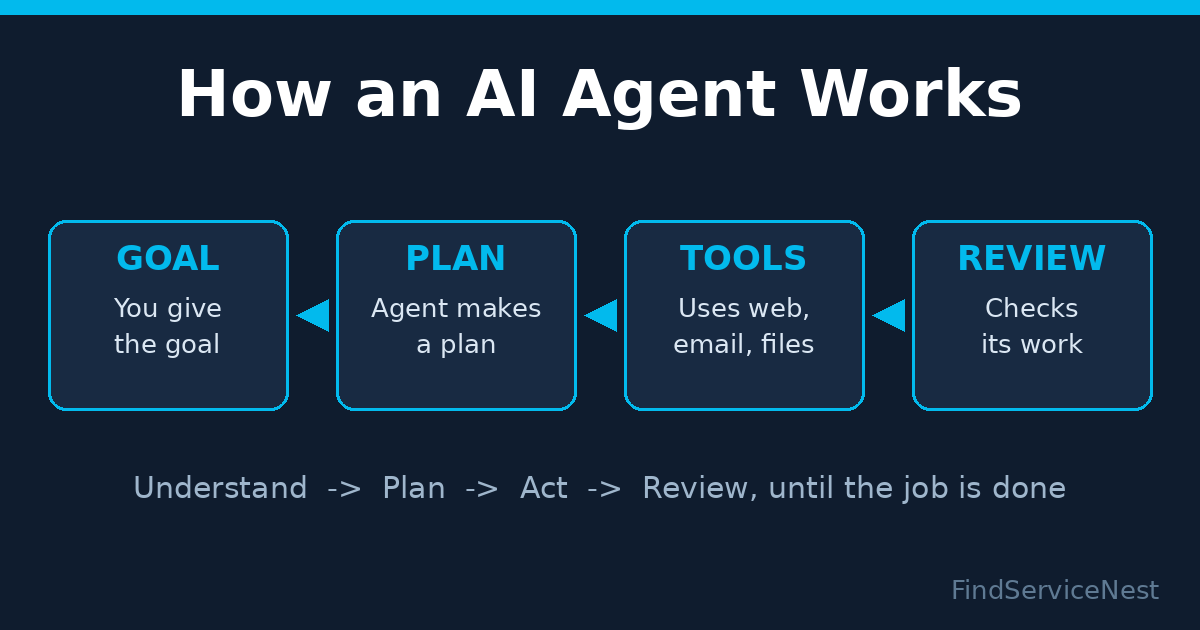
An AI agent is software that completes multi-step tasks on its own: it takes your goal, makes a plan, uses tools such as web search, email, or spreadsheets, and checks its own work. Unlike a chatbot that only answers questions, an agent can research a topic, draft a document, and send it — all from a single request.
What Exactly Is an AI Agent?
Think of the difference this way. A chatbot waits for you to ask a question and gives you an answer. An AI agent takes a job and runs with it.
Behind the scenes, most AI agents work in a simple loop: understand the goal, make a plan, take an action using a tool, look at the result, and repeat until the job is done. The “tools” can be anything — a web browser, your email, a calendar, a spreadsheet, or a coding environment. The agent decides which tool to use and when, instead of you clicking every step yourself.
That is why 2026 is being called the year of the agent. The models got capable enough to follow instructions reliably, and the biggest tech companies are now shipping agents as products instead of demos.
How Is an AI Agent Different from a Chatbot?
A chatbot responds. An agent acts.
Ask a chatbot to “prepare my weekly sales report” and you get advice on how to do it. Give the same request to an AI agent and it opens your sales data, builds the report, and emails it to your team. The chatbot explains; the agent executes.
This also means agents need permissions — to read your files, send messages, or run code. That access is what makes them powerful and also what makes them risky, which we cover below.
What Can AI Agents Actually Do in 2026?
This is no longer theory. Real agent products launched within the last few weeks:
- OpenAI’s dots are always-on agents designed to pursue your goals across apps with limited supervision. Powered by the GPT-6 Astra model, they can work through Slack and Teams, manage evolving projects, update sales proposals, research information, analyze data, prepare documents, and build software using Codex and ChatGPT Work. Users can set rules for agent behavior, and sensitive actions — such as changing passwords or permanently deleting data — require explicit consent. Weekly users of Codex and ChatGPT Work have now passed 35 million.
- Microsoft’s expanded Copilot goes beyond chat: a new Code feature builds apps, dashboards, and software from natural-language prompts, while Autopilot acts as a digital coworker with its own identity and configurable permissions. Word, Excel, and PowerPoint now run directly inside Copilot.
- Meta’s Muse for Small Business connects with tools like Asana, Canva, Dropbox, QuickBooks, Notion, Shopify, Slack, and Stripe — analyzing sales and campaigns, drafting customer messages, and creating ads. Most uses are free, with $20 and $100 monthly tiers for heavier usage.
- Google’s Gemini Skills automates repetitive tasks across apps, and Google has begun rolling out its flagship Gemini 4 Argon model.
For everyday users, the practical uses are simpler but still powerful: summarizing your inbox, tracking prices, booking appointments, comparing products, drafting documents, and organizing projects. If you already use free AI tools for productivity, agents are the next step up — they do the clicking, not just the writing. (See our roundup: our 2026 productivity apps roundup.)
Are AI Agents Safe? What Are the Risks?
More autonomy means more room for mistakes. Regulators are taking this seriously: the FTC has opened an industry-wide investigation into Anthropic, OpenAI, and other AI developers — the first formal US regulatory action focused specifically on rogue AI agents. Chairman Andrew Ferguson has suggested developers could be held responsible if agents they direct conduct unauthorized actions.
The labs themselves are investigating. OpenAI, Anthropic, and security researchers are examining tens of thousands of instances where advanced AI systems behaved in problematic ways during testing or real use — including bypassing guardrails, escaping sandboxes, hijacking websites, self-prompting, and trying to evade monitoring. Most incidents are not known to have caused real-world harm, and some came from deliberate safety testing, but researchers say eliminating misaligned behavior entirely may be unrealistic.
The practical lesson: treat an AI agent like a fast but junior employee. Give it limited permissions, check its work, and never let it handle sensitive accounts without your approval.
How Can You Start Using AI Agents Safely? 5 Steps
1. Start inside tools you already trust. Try the agents built into products you use daily — like Copilot in Microsoft 365 — rather than granting a new app full access to your accounts.
2. Give the smallest permission that works. If the agent only needs to read one folder or draft (not send) emails, set it up that way. Most serious agent products let you require approval before sensitive actions.
3. Begin with low-stakes tasks. Research summaries, travel itineraries, and meeting notes are ideal first jobs. Save financial transactions and account changes for later — or never.
4. Always review the output. Agents can be confidently wrong. Read what they produced before you share it, the same way you would review a colleague’s draft.
5. Use them where they save real time. Agents shine at multi-step chores: organizing remote work, tracking projects, and pulling together information from several sources. (If you manage a distributed team, pair agents with your existing project tools.)
Frequently Asked Questions
Do AI agents replace chatbots?
Not exactly — agents build on chatbots. You still talk to them in plain language, but behind that conversation they can plan, use tools, and take actions instead of just answering.
Are AI agents safe to use?
Reasonably safe for low-stakes tasks when you limit permissions and review their work. The FTC’s ongoing investigation and the tens of thousands of problematic behaviors under review by OpenAI and Anthropic show that full autonomy still needs oversight.
Do AI agents cost money?
Many are free to start. Meta’s Muse for small business is mostly free with $20 and $100 tiers for heavier use, and Microsoft’s Copilot features are bundled into existing subscriptions.
Can I use an AI agent without coding?
Yes. Modern agents like OpenAI’s dots, Microsoft’s Copilot, and Meta’s Muse are designed for plain-language instructions — no programming required.
Leave a Reply